
BASHA TECH
Ch03-04. 본문
728x90
3차 과제 시작날 : 2022.08.23
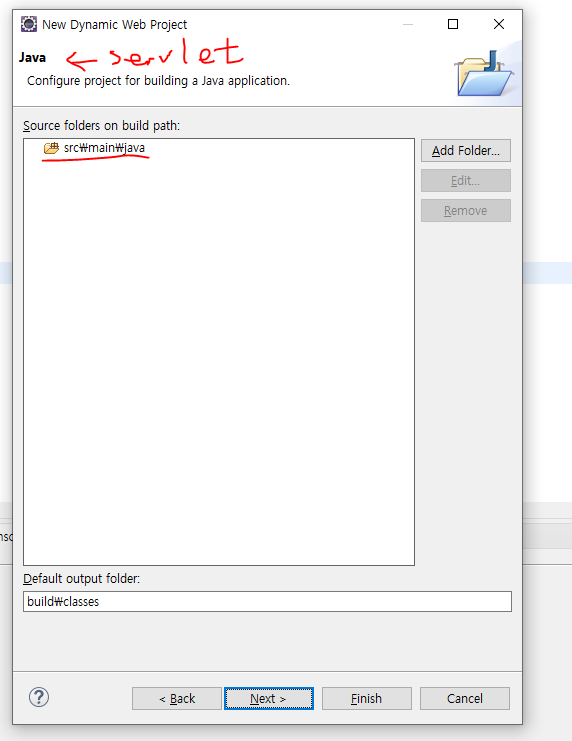
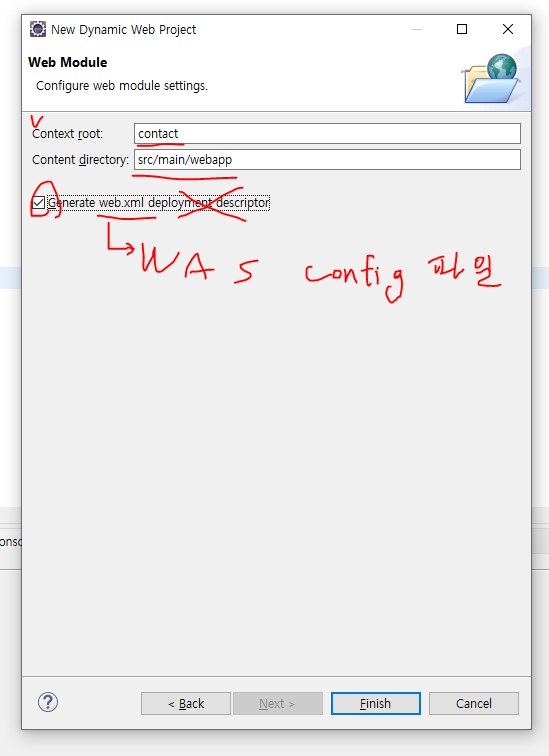
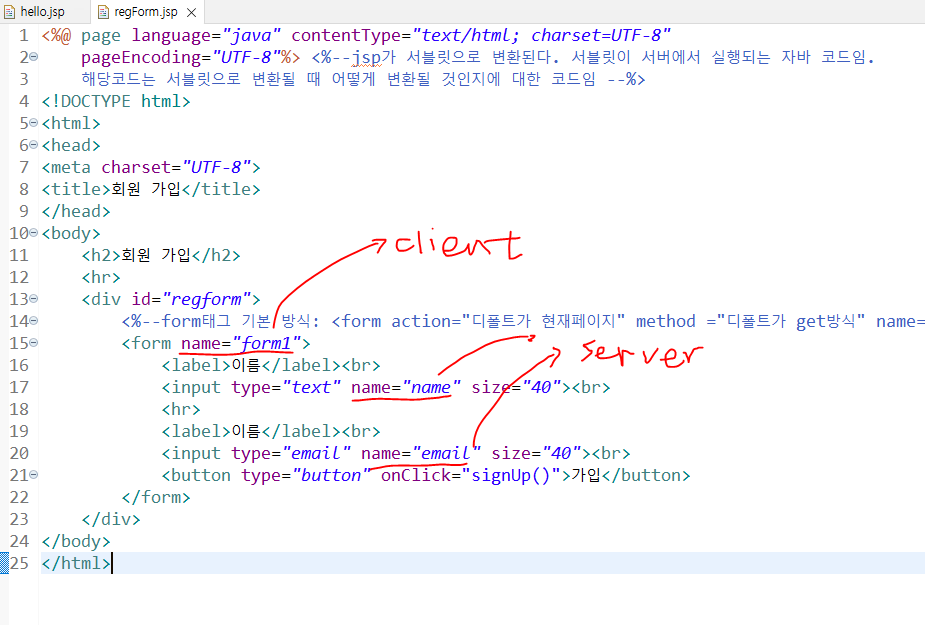
>regForm.jsp
<%@ page language="java" contentType="text/html; charset=UTF-8"
    pageEncoding="UTF-8"%> <%--jsp가 서블릿으로 변환된다. 서블릿이 서버에서 실행되는 자바 코드임.
	해당코드는 서블릿으로 변환될 때 어떻게 변환될 것인지에 대한 코드임 --%>
<!DOCTYPE html>
<html>
<head>
<meta charset="UTF-8">
<title>회원 가입</title>
<style> /*CSS 정의*/
	h2 {
		border-radius: 5px;
		background-color: wheat;
		text-align: center;
		padding: 15px 0px;
	}
	#regform {
		padding: 15px 20px;
		border-radius: 10px;
		margin: auto;
		width: 50%;
		background-color: SandyBrown;
	}
</style>
<script type="text/javascript"> // 자바 스크립트 정의
	function signUp() {
		alert("정말로 가입하시겠습니까?")
		document.getElementById("regform").style.display = "none";
		document.getElementById("rname").innerHTML = document.form1.name.value;
		document.getElementById("remail").innerHTML = document.form1.email.value;

		document.getElementById("result").setAttribute("style", "display:block; background-color:KhaKi;");
	<%-- 이 방식이 더 낫다. 위의 방식은 디버깅이 안되서 이게 낫다.
		document.getElementById("result").setAttribute("style");
		document.getElementById("result").style.display("block");
		document.getElementById("result").style.backgroundColor("KhaKi;");	코드로 빼면 backgroundColor -가 사라짐
	--%>
	}
</script>
</head>
<body> <!-- HTML 정의 -->
	<h2>회원 가입</h2>
	<hr>
	<div id="regform"><%--id value는 소문자로 표시한다 일반적으로 --%>
		<%--form태그 기본 방식: <form action="디폴트가 현재페이지" method ="디폴트가 get방식" name="form1">--%>
		<form name="form1">
			<label>이름</label><br>
			<input type="text" name="name" size="40"><br>
			<hr>
			<label>이메일</label><br>
			<input type="email" name="email" size="40"><br>
			<button type="button" onClick="signUp()">가입</button>
		</form>
	</div>

	<div id="result" class="result">
		<h3>가입 정보</h3>
		<hr>
		이름: <span id="rname"></span><br>
		이메일: <span id="remail"></span><br>
	</div>
	<script type="text/javascript"> //자바 스크립트 정의
			document.getElementById("result").style.display = "none";
	</script>
</body>
</html>회원 가입
<%--id value는 소문자로 표시한다 일반적으로 --%>
<%--form태그 기본 방식:
가입 정보
이름:
이메일:
>toDoApp.jsp
<%@ page language="java" contentType="text/html; charset=UTF-8"
    pageEncoding="UTF-8"%>
<!DOCTYPE html>
<html>
<head>
<meta charset="UTF-8">
<title>Insert title here</title>
<link href="https://cdn.jsdelivr.net/npm/bootstrap@5.1.3/dist/css/bootstrap.min.css" rel="stylesheet" integrity="sha384-1BmE4kWBq78iYhFldvKuhfTAU6auU8tT94WrHftjDbrCEXSU1oBoqyl2QvZ6jIW3" crossorigin="anonymous">
<script type="text/javascript">
	function addItem() {
		// 입력값을 읽어와 todo 변수에 저장
		let todo = document.getElementById("item");
		// <ul> 요소를 참조하여 list 변수에 저장
		let list = document.getElementById("todolist");
		// 새로운 <li> 요소를 생성하여 listitem 변수에 저장
		let listitem = document.createElement("li");

		// <li> 요소에 들어갈 닫기 버튼 생성
		let xbtn = document.createElement("button");

		// listitem : 새로운 목록에 디자인 추가
		listitem.className = "d-flex list-group-item list-group-item-action list-group-item-dark";
		listitem.innerText = todo.value;
		// 버튼에 부트스트랩 클래스 적용
		xbtn.className = "btn-close ms-auto";

		// close 버튼에 이벤트 등록
		xbtn.onclick = function(e) {
			// 이벤트가 발생한 <li> 요소를 구하여 <ul> 요소에서 제거
			let pnode = e.target.parentNode;
			list.removeChild(pnode);
		}

		// <li>에 버튼 추가
		listitem.appendChild(xbtn);
		// ul 요소에 li 요소 추가
		list.appendChild(listitem);

		// 입력칸 비우기 및 포커스 이동
		todo.value = "";
		todo.focus();
	}
</script>
</head>
<body>
	<div class="container bg-light shadow mx-auto mt-5 p-5 w-75">
		<!-- https://getbootstrap.kr/docs/5.1/customize/color/ 에서 색상 참고-->
		<h2>My ToDo App</h2>
		<hr>
		<div class="input-group">
			<input id="item" class="form-control" type="text" placeholder="할 일을 입력하세요.">
			<button type="button" class="btn btn-primary" onClick="addItem()">할일 추가</button>
		</div>
		<hr>
		<ul id="todolist" class="list-group"></ul>
	</div>

</body>
</html>My ToDo App
728x90
반응형
'Computer/JSP' Related Articles
more


Comments